How to Integrate SVN with Yodiz
Yodiz supports WebHook integration with Assembla. It will enable you to:
- * Track code commits by associating them with bugs or tasks. This will help you identifying which files are added, updated or deleted against a particular bug or task.
- * Mark your task or bug resolved just by following a simple convention when writing your comments for commit.
Integration Steps
- Login to Yodiz and click on SCM Integrations from "more" navigation menu
- Select Tortoise SVN from left
- Download hook post-commit-svn
- Download and install tortoise svn client (don't forget to install subversion client see screen below)
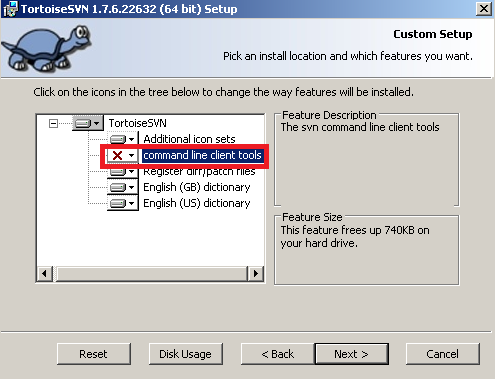
- Copy hook to your local machine.
- Add hook path into Tortoise SVN client for detail see Client Side Hook Scripts
- Add sh before script as shown in screen below, Be sure you have installed bash and curl support in you system
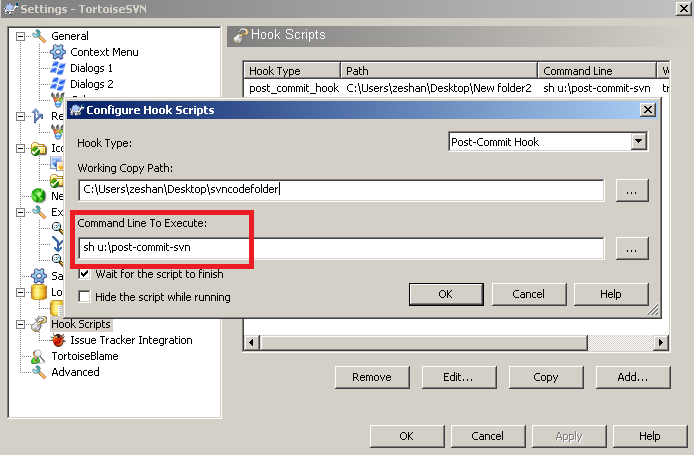
- Note: For Microsoft window users please download Bash curl and add its path in your Environment Variables e.g c:\bash-curl\
- For Tasks: use notation @T25
The commit message will be included in Task with ID 25. - To mark task done, use notation @T25:R
"R" will indicate that this task is completed and Yodiz system will update the task status automatically. - For Issues: use notation @B12
The commit message will be included in Issue with ID 12. - To mark Issue as "resolved", use notation @B12:R
"R" will indicate that this issue is resolved and Yodiz system will update the issue status automatically - If you face any issue, please Contact Support
How to Link commits to Tasks and Issues
In your commit message, add following notations to link commits to Tasks and Issues at Yodiz.

- © Yodiz 2015